Rotating Residential Proxy Quickstart
Create a traffic-based proxy user, select a country, protocol, and session type, and verify your BytesFlows exit IP with cURL.
Dynamic residential proxies use traffic-based billing. Choose rotation for independent requests or a sticky session for a workflow that needs continuity across multiple steps. Start with a few requests to check connectivity, the exit country, and your target's response.
1. Set up a proxy user and check your traffic
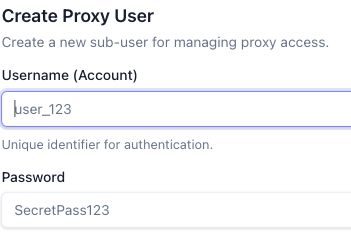
Open Dashboard → Residential Proxies↗ and confirm that you have enough Available Traffic for your test. To add traffic, open Buy Proxy↗ and check the terms for the plan you select at checkout.
Under Overview & Users, create a proxy sub-user. Keep the default traffic-based account type and enabled status. The dashboard accepts usernames of 4–20 characters and passwords of at least 6 characters. The Traffic Limit (GB) field sets a cap for that sub-user. A value of 0 removes the individual cap. Usage still draws from the account's available traffic.
Authenticate with this proxy sub-user's username and password. The Endpoint Generator adds the u- prefix and routing parameters to the proxy username. Your sign-in password and API key are used for their respective authentication flows.
2. Generate a proxy connection
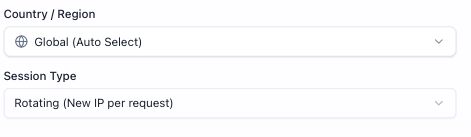
Open Endpoint Generator on the same page. Select the proxy user, country or region, protocol, and session type. Global (Auto Select) lets the gateway choose an exit. Selecting a country adds its code to the generated username.
| Client field | Value |
|---|---|
| Proxy host | p1.bytesflows.com |
| Proxy port | 8001 |
| Protocol | HTTP(S) or SOCKS5 |
| Proxy username | The full username from the Endpoint Generator |
| Proxy password | The proxy sub-user's password |
For a first test, select Rotating. For a workflow that needs the same exit, choose Sticky IP, select a duration, and reuse the generated credentials throughout the workflow. See Country Targeting and Sessions for the username format.
3. Verify your exit IP
Copy the cURL Example from the generator and run it in your terminal. The example requests https://ipinfo.io. Compare the returned IP and country with your direct connection and the country you selected. For an HTTPS destination reached through the HTTP proxy, the generated proxy URL starts with http://. In SOCKS5 mode, the cURL example uses socks5h://.
Then make one small request to your intended target. Use Traffic & Proxy Usage in the dashboard to review usage trends and records by source. See Integration and Troubleshooting for client setup and common connection issues.