Buy a Proxy Plan
Choose a rotating or static residential proxy plan in the dashboard, review checkout, and locate your traffic or instances after payment is confirmed.
Rotating residential plans provide a traffic allowance. Static residential plans provide a selected number of IPs for a term. Each product has its own place to verify fulfillment after payment.
Buy rotating residential traffic
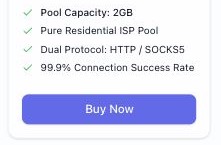
- Sign in and open Buy Proxy → Dynamic Residential↗.
- Compare the traffic allowance, validity period, and price, then select Buy Now on your chosen plan to open checkout. If you see a new-customer offer, check the plans available to your account and the amount shown at checkout.
- Review the selected plan, traffic, validity period, and total at checkout. See Payments, Wallet Top-ups, and Order Confirmation for payment options and checkout recovery.
- After payment is confirmed, open Residential Proxies↗ and check available traffic. Open the usage tab and select Purchase Orders to see the traffic record, its status, and expiry date.
Next step With traffic available, follow the Rotating Residential Proxy Quick Start to create a proxy user, generate a connection, and send a first test request. If you already have enough traffic, start with setup.
Buy static residential proxies

- Open Buy Proxy → Static Residential↗ and choose a location, proxy tier, and use case as needed.
- Select nodes, IP quantity, and term. Review the node details, IP count, total, and auto-renewal option before confirming.
- Complete payment. Once the order is provisioned, open Static Proxy Management↗ to find the new instances and their credentials.
- Run the static proxy connection test. See Management & FAQ for instance management and renewal.
If traffic or instances do not appear
Check the original order and the corresponding product page. Returning from checkout or seeing an order-created message can precede payment confirmation and fulfillment. Keep the original order ID and use the payment troubleshooting guide before placing another order.
Management & FAQ
Instance management, automatic renewal rules, IP retention before expiry, and troubleshooting tips for static residential proxies.
Payments, Wallet Top-ups, and Order Confirmation
Use wallet balance or a payment option shown at checkout, verify wallet top-ups and proxy fulfillment, and troubleshoot payments with the original order ID.